How do I exit, submit or continue a quiz?
Tap × during a quiz. Submit Quiz ends it with a result for the questions you answered, Quit Quiz Without Saving leaves, Continue Quiz goes on.
Updated · iOS and Android
You can stop a quiz before its last question. Tap the × in the top-left corner of the quiz. Once you have answered a question, in a quiz such as Random Mix, the Submit Quiz? sheet opens and tells you how many questions you have answered, for example: "You've answered only 1 of 30 questions. Submitting now will end the quiz and show a result based on your answers."
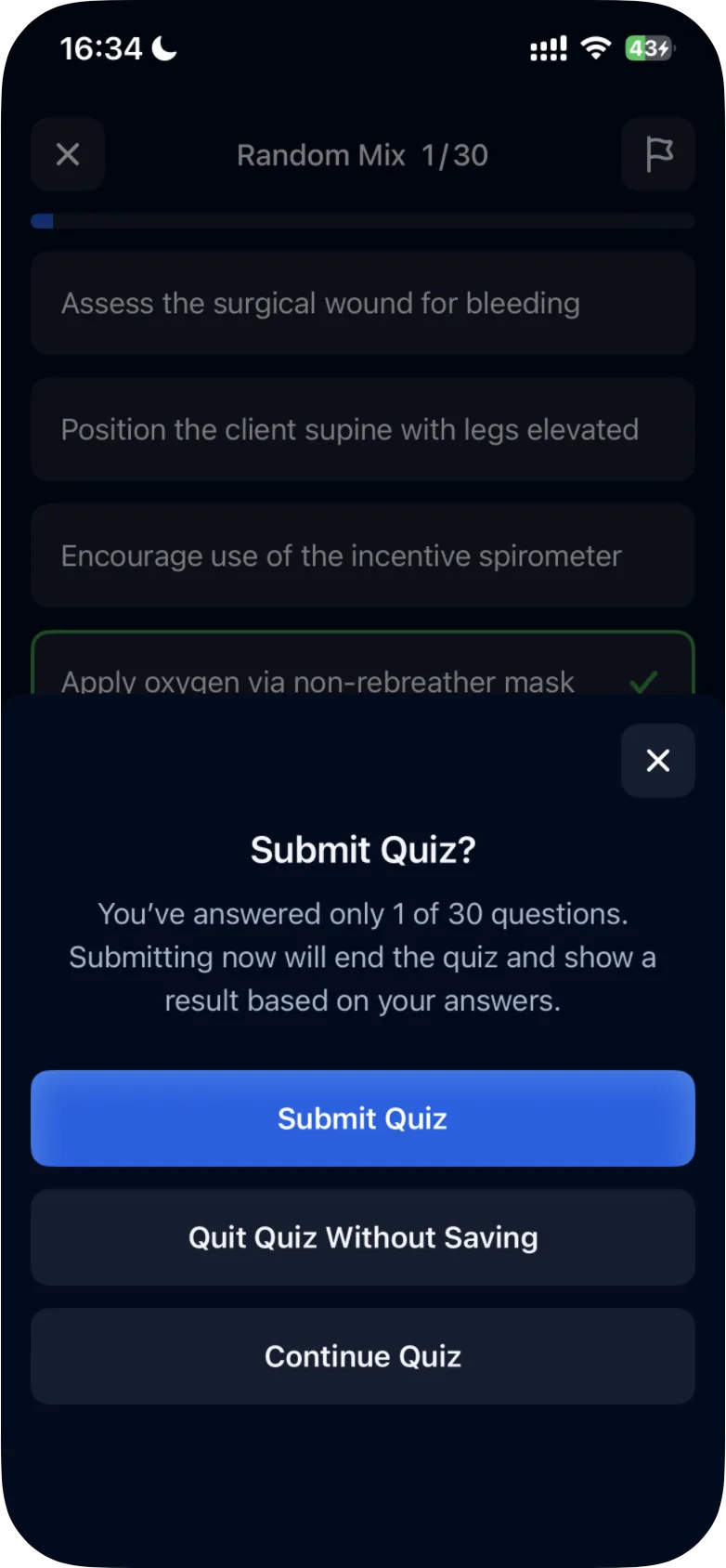
The sheet has three buttons, and they do different things:
| Button | What it does |
|---|---|
| Submit Quiz | Ends the quiz and shows your result, based on the questions you answered |
| Quit Quiz Without Saving | Leaves the quiz without saving it, so you don't get a result |
| Continue Quiz | Takes you back to the quiz to keep answering |
Leaving a quiz and coming back
- Before you answer any question, × opens Quit Quiz?: "You haven't answered any questions yet", with Quit Quiz and Continue Quiz. Quit Quiz takes you back to the Study tab.
- After you answer a question, × opens Submit Quiz? (for example, "You've answered only 1 of 10 questions."), with Submit Quiz, Quit Quiz Without Saving and Continue Quiz.
- On the last question, the button after your answer is Submit Quiz. It ends the quiz and opens the results straight away, without a sheet.
iOS
In the iPhone app:
- Quit Quiz? was seen in the Missed, Saved and Mastered Questions quizzes.
- The × on the Submit Quiz? sheet closes it and takes you back to the quiz.
- After Quit Quiz Without Saving, tapping Take a Quick 10 Quiz started a new quiz at Quick 10 1/10, without a Resume Unfinished Quiz? sheet.
What a submitted result counts
Only the questions you answered count. If you answer one question of 30 correctly and tap Submit Quiz, the results show Correct 1 / 1 and 100%. A question you didn't answer is not counted as answered. How to read the results: see how to read your quiz results.
Other ways a quiz can stop
- Free questions used up: without a subscription, after your last free question the app shows You're on a Roll! with Continue Quiz With Free Trial and Submit Quiz. Submit Quiz shows your results. See what is available for free.
- Case studies: Submit Case Study ends a case study and opens its results. In the Android app, × before your first answer opens Quit Case Study?, with Quit Case Study and Continue Case Study. See how case studies work.
Was this helpful?
Related questions
- Quizzes & Study ModesHow do I read my quiz results?The results screen shows how many answers were correct and incorrect, the share of correct answers as a percentage, and the questions to review.
- Quizzes & Study ModesHow do I take a practice quiz?Tap Take a Quick 10 Quiz on the Study tab, choose an answer, tap Continue to check it, read the explanation and tap Next Question. Results come at the end.
- Quizzes & Study ModesWhat quiz modes are available in ExamReady?The Quick 10, Question of the Day, Game Mode, case studies and four quiz modes (Random Mix, Missed, Saved, Mastered), for all topics or one topic.
- Quizzes & Study ModesHow do NGN case studies work?A case study is six questions about one client, with the patient's data in tabs. How to answer, read the exhibits and how +/- and 0/1 scoring work.